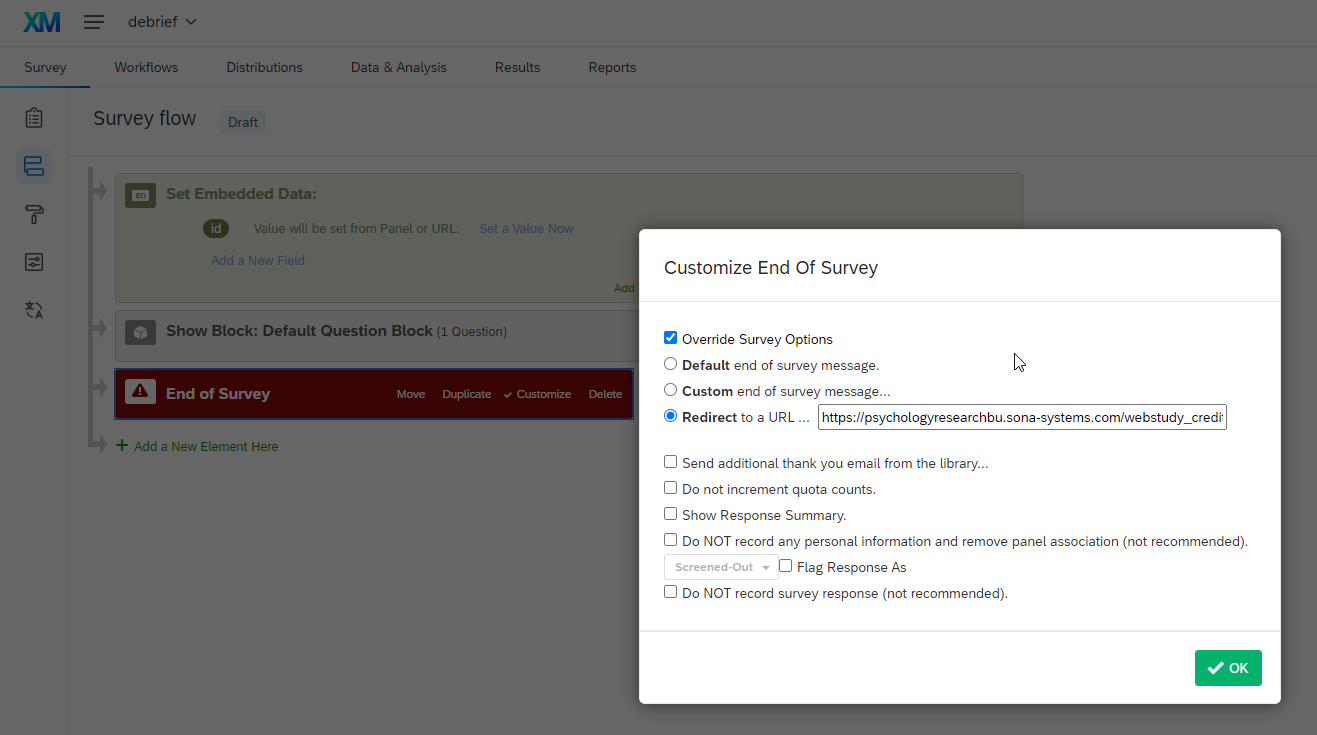
https://psychologyresearchbu.sona-systems.com/webstudy_credit.aspx?experiment_id=2820&credit_token=db1954d95a3c4c4b8c90cb449e31aad9&survey_code=${e://Field/id}8 Awarding credit
Note
The purpose of this section is to locate the link from the Qualtrics debrief back to SONA, awarding credit
My Studies -> … locate your study … -> Study information -> website -> qualtrics redirect to a url
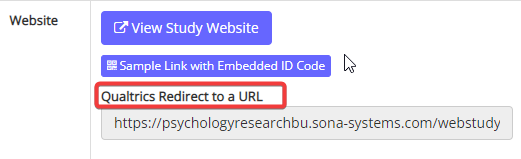
… you have a link called “qualtrics redirect to a url” that is obscured but which if you click on it and paste it into a text editor, reads:
Tip
It is composed of
- a return to the credit-granting part of SONA
https://psychologyresearchbu.sona-systems.com/webstudy_credit.aspx- then an indentifier for the experiment on the SONA system
?experiment_id=2818- then a token that (only) gets passed when someone completes the experiment as opposed to abandoning it half-way
&credit_token=9d617f674ad749118e486b2fc7a45b5e- then the participant id that sona passed to qualtrics is sent back so that sona can grant credit to the right person.
&survey_code=${e://Field/id}The way you use this link is right at the end of your study, after the debrief information has been presented in the Qualtrics debrief survey.
So long as you add a Set Embedded Data field to receive id, and an End of Survey that you ‘customise’, and then select to ‘overwrite survey options’, you will be able to paste the link into “Redirect to a URL”